
On this page
Before you log in
You need two things for a DMPlay game login: the phone number (or email) linked to your account and your password. If you have never created an account, start with our DMPlay register guide — logging in with an unregistered number always fails.
Also make sure you are on the right page. Fake login pages are the number-one way people lose accounts. Use the DMPlay login link from this site or a bookmark you saved yourself, and check that the page shows the red-and-gold DmPlay logo at the top.
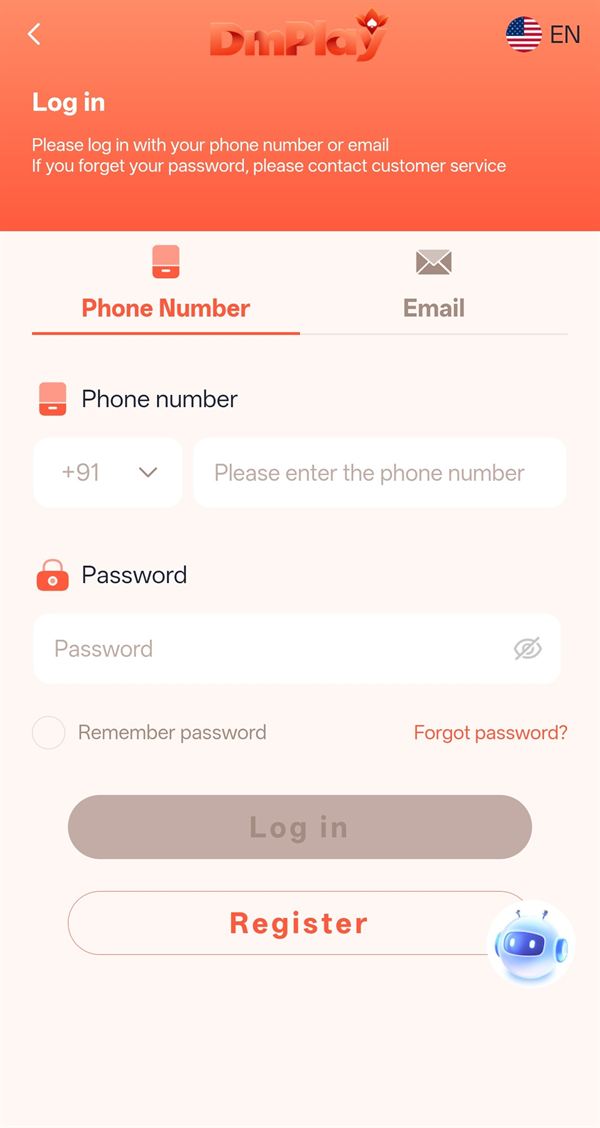
How to log in to DMPlay (step by step)
The login screen says it plainly: *"Please log in with your phone number or email."* Here is the full flow:
- Open the DMPlay login page in Chrome, or tap the DMPlay icon if you installed the APK or added it to your home screen.
- Pick a tab at the top — Phone Number or Email.
- For phone login, keep the country code on +91 and type your 10-digit number without a leading zero.
- Enter your Password. Tap the eye icon to check what you typed — passwords are case-sensitive.
- Tick Remember password only if this is your own phone.
- Tap Log in. The lobby opens with your balance at the top.
Phone number vs email login
| Phone Number tab | Email tab | |
|---|---|---|
| Best for | Most players — it is how accounts are created | Players who later linked an email |
| What you type | +91 and 10-digit mobile number | Full email address |
| Common mistake | Adding 0 or +91 again inside the number box | Typos in the domain (gmial.com) |
If you never added an email to your account, use the Phone Number tab — the Email tab will not recognise you.
Forgot your DMPlay password?
The login screen also says: *"If you forget your password, please contact customer service."* You have two routes:
- Forgot password? link — tap it under the password box and follow the on-screen steps to set a new password.
- Customer service chat — tap the small robot icon at the bottom right of the screen and ask the support agent to help you reset access. Have your registered phone number ready.
When you choose a new password, pick one you have never used elsewhere — at least eight characters with letters and numbers. Support staff will never need your old password, OTP or UPI PIN.
What you see after logging in
After a successful DMPlay login the home screen shows:
- Balance at the top with a + button to add funds, plus download and message icons.
- Platform recommendation — featured games such as Aviator, Chicken Road 2 and Vortex.
- Popular — JILI slots like Fortune Gems 2 and Fortune Garuda 1000.
- A bottom menu: Home, Activity (offers), Get ₹500 (lucky wheel), Promotion (invite & referral) and Account (profile, bank, history).
Learn what each game does in our DMPlay games guide and read the offer rules in the DMPlay bonus guide.
Common DM Play login problems and fixes
| Problem | Likely cause | What to do |
|---|---|---|
| "Account does not exist" | Number not registered or typed wrongly | Re-check the digits or create an account |
| "Wrong password" | Caps lock or an old password | Use the eye icon, then Forgot password? if needed |
| Email login fails | No email linked to the account | Switch to the Phone Number tab |
| Log in button stays grey | A field is empty | Fill both number and password |
| Page will not open | Old link or blocked domain | Use the latest login link and clear browser cache |
| App closes after login | Outdated APK | Install the newest version from our APK guide |
DMPlay login on PC or laptop
There is no separate desktop program. Open the login link in Chrome or Edge on your computer and sign in with the same number and password. Your balance and history are tied to the account, not the device, so they appear the same everywhere.
Keep your DMPlay account safe
- Never share your OTP, password or UPI PIN — real support will never ask for them.
- Log out on shared devices and do not save your password in someone else's browser.
- Ignore Telegram or WhatsApp messages offering to "unlock" or "recover" accounts for a fee.
- Change your password right away if you notice activity you don't recognise.
- Before playing, set limits as explained on our responsible gaming page.
Frequently asked questions
What do I need for DMPlay login?
Your registered phone number (or a linked email) and your password.
Can I log in to DMPlay with email?
Yes. The login screen has a Phone Number tab and an Email tab. Use Email only if you have linked an email address to your account.
I forgot my DMPlay password. What should I do?
Tap Forgot password? under the password box, or contact customer service using the chat icon on the login screen.
Why does DMPlay say my account does not exist?
Either the number is not registered yet or it was typed incorrectly. Re-check the digits or create a new account first.
Can I log in to DM Play on two phones?
Yes, you can log in from another device with the same number and password. For safety, log out from devices you no longer use.
Is the DMPlay game login the same on the app and website?
Yes. The same account works in the Android APK and in the mobile or desktop browser.